 English
 Español
 Deutsch
 日本語
日本語 Français
 Русский
 Italiano
 Nederlands
 한국어
한국어 Svenska
 Dansk
Dansk Norsk
Norsk Suomi
SuomiWhat is Custom Drive Mad?
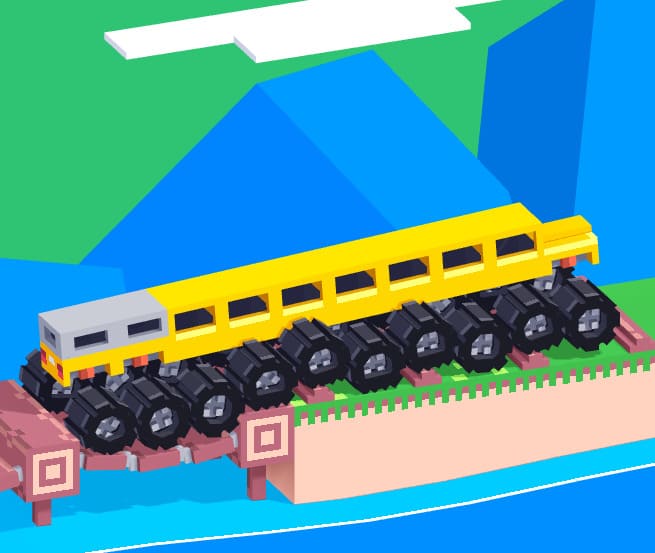
Custom Drive Mad is a variation of the original driving challenge game that introduces user-created or modified levels with unique layouts and mechanics. While it keeps the same core physics-based driving system, the “custom” aspect means levels can be less predictable, often featuring creative obstacles, unusual terrain, or unexpected traps.
Compared to standard levels, custom stages may experiment with balance, timing, or even trick-based driving. This makes the experience feel less repetitive and more skill-focused, as players need to quickly adapt to new designs rather than relying on memorized patterns. It’s a good choice if you’ve already played the base game and want something less familiar.
How to Play Custom Drive Mad Online?
In Custom Drive Mad, your objective remains simple: reach the end of each level without crashing. However, custom levels often require more careful observation before moving. Instead of accelerating immediately, it’s better to take a second to look at the terrain and identify potential problem areas like steep drops, unstable platforms, or narrow landing zones.
Because level designs can vary widely, there is no single strategy that works everywhere. Some levels require slow, controlled movement to maintain balance, while others may need short bursts of speed to clear gaps. Pay attention to how your vehicle reacts to different surfaces—custom maps often exaggerate physics behavior, making oversteering or over-accelerating more punishing than usual.
What Are the Controls in Custom Drive Mad?
The controls remain consistent with the original game:
- Forward / Accelerate: Arrow Right or D
- Backward / Brake: Arrow Left or A
Even though the controls are simple, custom levels make precise input more important. Quick taps are often better than holding down a key, especially when trying to keep your balance on uneven or narrow platforms.
Custom Drive Mad Tips & Strategy
One of the most effective strategies is to avoid committing to full speed too early. Many custom levels are designed to trick players into rushing, leading to flips or missed landings. Start slowly, test how the vehicle reacts, and then increase speed only when you understand the layout.
Another important tip is to control your landing angles. When jumping or dropping from a height, try to keep your vehicle level so both wheels land evenly. If your front wheel hits first at a steep angle, you’re more likely to flip. Also, don’t hesitate to reverse slightly before an obstacle—backing up can give you a better approach angle and improve your chances of success.
Game Features
Custom Drive Mad stands out because of its varied level design. Unlike standard levels that follow a consistent difficulty curve, custom stages can introduce unexpected challenges at any point. This keeps the gameplay fresh and requires players to adapt quickly rather than rely on repetition.
The physics system remains the core of the experience, meaning every movement and adjustment has a visible impact on your vehicle. Combined with creative level layouts, this creates a gameplay loop where experimentation and careful control are more important than speed alone.
Common Mistakes
A frequent mistake is treating custom levels the same as standard ones. Players often rush forward expecting familiar patterns, which usually leads to early crashes. Taking a moment to observe the level can prevent unnecessary retries.
Another issue is overcorrecting when the vehicle starts to tilt. Sudden, large inputs often make things worse. Instead, use small adjustments to stabilize your car. Lastly, many players underestimate the importance of braking—slowing down at the right time is often the key to completing more difficult custom stages.
Frequently Asked Questions
Is the game free to play?
Yes, Custom Drive Mad is completely free to play online. There are no hidden fees or purchases required; just enjoy the game on supported web browsers.
What should I do if the game doesn't load?
Ensure you have a stable internet connection, use an updated browser like Chrome or Firefox, and disable any ad blockers or extensions that might interfere with the game's loading process.
Are there any multiplayer or social features?
Currently, the game focuses on single-player gameplay with level completion and customization. You can share your custom tracks with others, but real-time multiplayer is not available.
You Might Also Like games



























Comment