 English
 Español
 Deutsch
 日本語
日本語 Français
 Русский
 Italiano
 Nederlands
 한국어
한국어 Svenska
 Dansk
Dansk Norsk
Norsk Suomi
SuomiWhat is Custom Drive Mad?
Custom Drive Mad is a community-style variation of the original Drive Mad driving game where levels are redesigned with different layouts, physics challenges, and experimental obstacle setups. Instead of following a fixed campaign structure, you'll often encounter stages that feel unpredictable—one level might focus on steep climbing sections, while another could throw you into narrow bridge balancing or sudden drop-offs that test your timing.
The core driving physics remains the same, but the pacing of each level feels more experimental. Some maps are built around slow balance control, while others force you to react quickly to unstable terrain. Because of this, Custom Drive Mad often feels closer to a puzzle-driving hybrid rather than a traditional racing game.
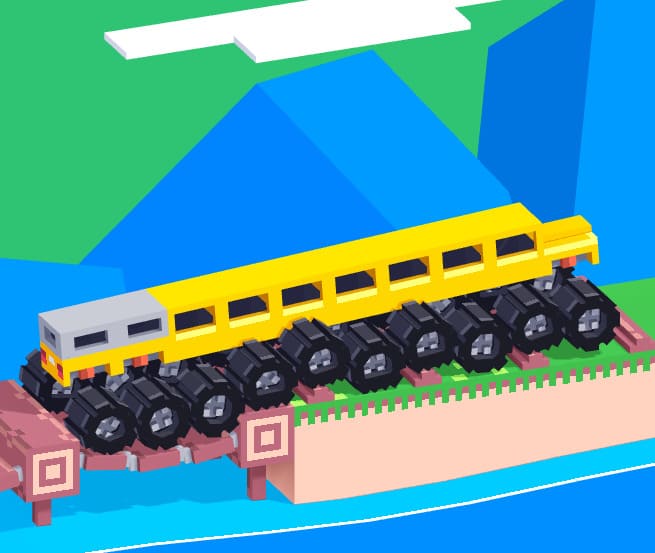
How to Play Custom Drive Mad Online?
The goal is still simple: reach the finish line without flipping your vehicle. However, custom levels reward observation more than speed. Many players make the mistake of pressing forward immediately, but in most cases it's better to pause for a second and “read” the level first.
For example, you might see a ramp that looks safe at first, but leads into a sharp landing that flips your car if you go in too fast. Or a flat section that suddenly transitions into a thin bridge where even a small acceleration mistake causes a fall. These small surprises are what make custom levels feel less predictable than the standard game.
A good approach is to treat each section like a test: move slowly into unknown terrain, adjust your speed based on slope changes, and only accelerate when your vehicle is stable. Momentum matters a lot—once your car tilts too far forward or backward, recovery becomes much harder than in normal levels.
What Are the Controls in Custom Drive Mad?
The controls are simple and unchanged from the original game:
- Forward / Accelerate: Arrow Right or D
- Backward / Brake: Arrow Left or A
Even though the input system is minimal, precision becomes much more important in custom levels. Instead of holding keys continuously, many situations require short taps to fine-tune your balance. This is especially useful when driving over uneven platforms or landing from jumps.
Custom Drive Mad Tips & Strategy
One of the biggest improvements players can make is learning when not to accelerate. Custom levels often punish early speed, especially when terrain is hidden or visually misleading. Slower first attempts usually lead to better understanding of the level layout.
Another key skill is managing landing physics. If your front wheel touches the ground first after a jump, the car is likely to rotate forward and crash. Keeping your vehicle level in the air—even by briefly tapping reverse or forward mid-jump—can completely change the outcome of a section.
It also helps to use reverse more strategically than most players expect. In many levels, backing up slightly gives you a better angle for ramps or prevents over-rotation before narrow platforms. Think of reverse not as failure, but as a positioning tool.
Game Features
Custom Drive Mad feels different from standard levels mainly because of its unpredictability. Instead of a smooth difficulty curve, you often jump between easy-looking sections and sudden precision-based challenges. This makes each run feel slightly different, especially when terrain designs force you to rethink speed and balance constantly.
The driving physics system plays a major role in this variation. Small changes in acceleration can drastically affect how your vehicle rotates or lands. Combined with experimental level design, the game becomes less about memorizing patterns and more about reacting to what's in front of you in real time.
Common Mistakes
One of the most common mistakes is assuming every level is meant to be rushed. Many players hold forward too long and lose control on slopes or uneven landings. In custom stages, patience usually matters more than raw speed.
Another frequent issue is overcorrecting when the vehicle tilts. Large sudden inputs often cause the opposite reaction, making flips even worse. Small, controlled adjustments are usually enough to recover balance.
Players also tend to underestimate braking. Slowing down before ramps or unstable platforms often gives you far more control than trying to fix your position mid-air or mid-fall.
Category and Tags
Frequently Asked Questions
Is the game free to play?
Yes, Custom Drive Mad is completely free to play online. There are no hidden fees or purchases required; just enjoy the game on supported web browsers.
What should I do if the game doesn't load?
Ensure you have a stable internet connection, use an updated browser like Chrome or Firefox, and disable any ad blockers or extensions that might interfere with the game's loading process.
Are there any multiplayer or social features?
Currently, the game focuses on single-player gameplay with level completion and customization. You can share your custom tracks with others, but real-time multiplayer is not available.
You Might Also Like games































Comment