 English
 Español
 Deutsch
 日本語
日本語 Français
 Русский
 Italiano
 Nederlands
 한국어
한국어 Svenska
 Dansk
Dansk Norsk
Norsk Suomi
SuomiWhat is Police Drive?
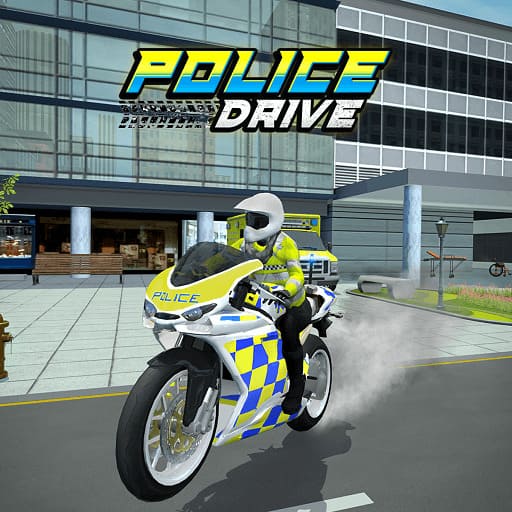
Police Drive is a driving chase game where you step into the role of a police officer trying to stop escaping criminals through busy city roads. At first glance it feels like a simple racing game, but once you start chasing suspects through traffic-heavy streets, you quickly realize it's more about control and timing than raw speed.
Each chase feels a bit different. Sometimes the suspect takes tight alleyways where even a small mistake sends you crashing into walls or traffic. Other times you get long straight roads where you have to decide whether to push speed or stay cautious for upcoming turns. That constant decision-making is what makes the game more engaging than typical driving games.
How to Play Police Drive Online?
In Police Drive, your main goal is to catch the target vehicle before it escapes the area. You're not just racing—you're trying to maintain control while everything around you moves fast. One small mistake, like hitting civilian traffic or misjudging a corner, can slow you down enough for the suspect to get away.
What makes gameplay interesting is how each chase forces you to adapt. Some missions reward aggressive driving where you push forward quickly, while others punish it heavily and require patience. You often find yourself balancing between “I need to catch up” and “If I go too fast here, I'll lose everything.”
Pay attention to road layout and traffic flow. Many players fail not because they are too slow, but because they overcorrect during turns or panic when the suspect suddenly changes direction.
What Are the Controls in Police Drive?
The controls are simple and easy to learn, but the challenge comes from how precisely you use them during high-speed chases.
- Accelerate / Forward: Arrow Up or W
- Brake / Reverse: Arrow Down or S
- Steer Left: Arrow Left or A
- Steer Right: Arrow Right or D
On mobile, you use touch controls to steer and control speed. While the game is playable immediately without learning complex mechanics, you'll quickly notice that small steering adjustments work better than sharp movements, especially in crowded streets or narrow turns.
Police Drive Tips & Strategy
One of the most important things in Police Drive is learning when not to chase at full speed. Many new players lose missions because they try to stay as close as possible to the suspect at all times, but that often leads to crashes in tight areas.
A better approach is to “read” the road ahead. If you see a sharp turn coming, it's usually better to slow down slightly before entering it rather than trying to brake inside the corner. This alone can prevent most early mistakes.
Another useful habit is to focus on positioning instead of just following directly behind the suspect. In some levels, you can anticipate where the escape route leads and cut off angles instead of reacting too late. This makes chases feel more strategic rather than purely reactive.
Game Features
Police Drive features a mix of chase-based missions set across different city environments. As you progress, road layouts become more complex, with tighter turns, heavier traffic, and more unpredictable escape paths.
The driving physics feel slightly weighty, which actually adds to the challenge—you can't just turn instantly or stop on demand. Collisions matter, and even small impacts can affect your ability to continue the chase effectively.
Each mission is short enough for quick play sessions but challenging enough that you'll often replay levels to improve your performance or complete them without mistakes.
Why Players Enjoy Police Drive
Players tend to enjoy Police Drive because it creates tension in a simple format. You're constantly making small decisions under pressure—whether to speed up, slow down, or reposition—and those decisions directly affect whether you succeed or fail.
It also works well for short sessions. You can play a few chases quickly, but the difficulty curve encourages replaying levels to improve your driving accuracy and timing. Over time, the game shifts from “just catching cars” to learning how to control every movement more efficiently.
Frequently Asked Questions
Can I damage my vehicle in the game?
Yes, the game features a damage system. Crashing into obstacles or civilian cars will reduce your vehicle's health, and if it reaches zero, the mission fails.
How do I arrest a suspect in a chase?
You must stay close to the suspect's vehicle and use tactical maneuvers to block their path or force them to stop. In some levels, you need to maintain a position near them for a certain amount of time.
Is Police Drive an open-world game?
It features a large city environment that allows for significant exploration, though your primary actions are focused on specific missions and pursuit objectives.
Are there different types of missions?
Yes, missions range from high-speed highway pursuits and timed patrols to precision driving through obstacle-heavy city blocks.
What happens if I hit a civilian car?
Hitting civilian cars will damage your police cruiser and may result in a score penalty or mission failure depending on the severity of the collision.
How do I restart a level if I crash?
You can instantly restart any mission by clicking the Reset icon on the screen or pressing the 'R' key on your keyboard.
You Might Also Like games































Comment
ステージはいくつもあるんですか