 English
 Español
 Deutsch
 日本語
日本語 Français
 Русский
 Italiano
 Nederlands
 한국어
한국어 Svenska
 Dansk
Dansk Norsk
Norsk Suomi
SuomiWhat is Drive Monster?
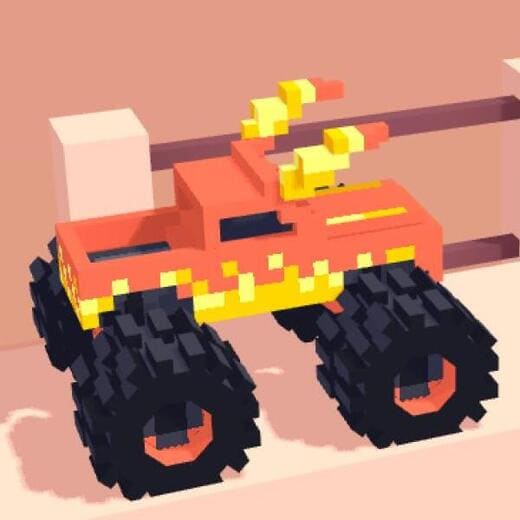
Drive Monster is a physics-based monster truck driving game where control matters more than pure speed. Instead of simple racing, the focus is on keeping a heavy truck stable as it climbs hills, hits ramps, and lands from jumps. Each level is built around uneven terrain, so even small mistakes in acceleration or landing angle can completely change the outcome of a run.
What makes the game stand out is how “heavy” the vehicles feel. The trucks don't respond instantly, and that slight delay forces players to think ahead rather than react at the last second. A jump that looks easy at first often becomes tricky once you realize how easily the truck can tilt forward or land awkwardly on its nose.
How to Play Drive Monster Online?
The goal in Drive Monster is simple: reach the finish line without flipping over. But in practice, each track feels like a small puzzle where speed, timing, and balance all matter at once.
Basic gameplay flow:
- Start driving forward and gradually build up speed instead of accelerating instantly.
- Approach ramps with control—most crashes happen when players go in too fast.
- In the air, adjust the truck’s angle so both wheels touch the ground as evenly as possible.
- On steep hills, ease off the throttle to avoid losing control at the peak.
- Try to maintain momentum, but don’t sacrifice stability for speed.
Most players fail not because of obstacles themselves, but because of timing mistakes before or after jumps. Learning when to slow down is just as important as knowing when to accelerate.
What Are the Controls in Drive Monster?
The controls are simple, but precision is what makes the difference:
- Accelerate: Arrow Right or D
- Brake / Reverse: Arrow Left or A
- Balance in air: Adjust tilt using forward/back input while airborne
Even though the control scheme is minimal, mastering it takes practice. Small mid-air adjustments are often the difference between a clean landing and a full flip, especially on levels with steep ramps or uneven drop-offs.
Drive Monster Tips & Strategy
One of the most common mistakes is treating every ramp the same. In reality, each jump requires a slightly different approach depending on the slope and distance. Going full speed rarely helps—controlled acceleration usually gives better results.
When landing, try to keep the truck level instead of forcing a forward or backward tilt. A slightly uneven landing can build into a full rollover on the next bump. On uphill sections, many players lose momentum by braking too much; it’s often better to ease off the throttle rather than stop completely.
As you progress, you'll start recognizing patterns in track design. Repeated failures are actually part of learning the timing of each section rather than just “retrying the level.”
Game Features
Drive Monster focuses on physics-driven driving rather than traditional racing speed. Each truck behaves differently in terms of weight distribution and suspension response, which makes switching vehicles noticeably change how levels feel.
The tracks are designed around risk and control—short gaps, sudden ramps, and uneven landings force players to constantly adjust their driving style. There's also a quick restart system, so failed attempts never feel punishing and instead encourage experimentation.
Why Players Enjoy Drive Monster
What keeps players coming back is the “almost made it” feeling. Runs often end just before the finish line due to a small mistake, which makes each retry feel meaningful rather than repetitive.
It's also a game that works well in short sessions. You don't need long playtime to improve—each attempt teaches something new about timing or control. Because it runs directly in the browser, it's easy to jump in for a few minutes and still feel like you made progress.
Category and Tags
Frequently Asked Questions
Why does my truck keep flipping over?
The game relies heavily on realistic physics. If you accelerate too quickly on a ramp or brake suddenly, the high center of gravity will cause the truck to flip. Success requires careful throttle control.
Is Drive Monster free to play?
Yes, the game is completely free to play directly in your web browser on both desktop and mobile devices.
How many levels are available in the game?
The game features dozens of unique levels, each with different layouts, obstacles, and environmental puzzles that increase in difficulty as you progress.
What is the main objective of each level?
Your goal is to navigate the terrain and reach the finish line safely without crashing or flipping your truck upside down.
Can I skip a level if it is too difficult?
Generally, levels are unlocked sequentially. You must complete the current track to advance to the next set of challenges in the Drive Mad universe.
Does the game support mobile browsers?
Yes, Drive Monster is optimized for mobile play, allowing you to enjoy the physics-based action on smartphones and tablets without downloading an app.
What makes the tracks in Drive Monster different from Drive Mad?
While it shares the same core engine, Drive Monster features custom-designed tracks specifically tuned for larger wheels and different suspension physics, offering a fresh challenge for veteran players.
You Might Also Like games
































Comment
Those oversized wheels make the tricky balance puzzles in Level 15 much more manageable.